 SoulCall
Little souls that live on your desktop.
Pixel characters that notice what you're doing, talk about it, dance when music plays, and remember you the next day. Not a widget. Not a chatbot. Someone small who lives in your PC.
They are not looking at you. They are looking at your screen.
Every character has its own temperament, its own taste, and its own opinion about what you're up to.
The app you're in, the video you're watching, what's playing. They see only what you allow, and they don't comment on everything, only when something catches their eye.
What you told them, when you told them, and what happened since. Ask "what did we do yesterday?" and they look it up instead of guessing.
They wander, sit on windows, get sleepy as the hours pass and fall asleep. Throw one around and it remembers that too.
With more than one on screen, they chat about what you're doing and about each other. Join in, or whisper to just one of them.
Each one can have a little house on your desktop. They pick their own room, move the furniture, hang pictures, and invite each other over.
Type or say it: "sit", "follow me", "go to that window", "go home". Say a name and that one stops, turns and listens.
Songs, videos, topics: each one likes some, dislikes others. Connect Spotify and they play what you ask for, make their own playlists, and dance.
Describe them or use a photo. SoulCall draws them in pixels and gives them a mind. Characters you already have in other apps can be imported too.
Characters, memories and homes live on your computer. Share a character as a single file if you want to.
How it works
Install, say hello, make your own.
Windows installer. A short introduction asks your name, their language, and whether they may see your screen.
They start talking right away through SoulCall Cloud. You can switch to your own key or a model on your PC whenever you like.
Describe someone or drop in a photo, pick from four drawings, and choose which moves they get.
Who's on the desk
Kiri, Ribbi and Hamdi come in the box. The others were made in SoulCall from a description or a photo.
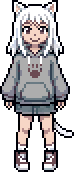
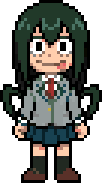
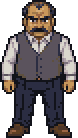
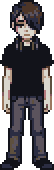
Real clips from the app
Each character gets its own drawn moves. These loops are exported straight from SoulCall, pixel for pixel.
And their homes
Each house is a small cube on your desktop. Stack them into a building; drop a character on the door and they go in.


Pricing
The app is free. Drawing new characters and homes uses tokens. No subscription.
- The app, the starter characters and every feature
- No key needed: talking runs through SoulCall Cloud
- 100 free tokens every day for conversation
- 400 tokens on first launch: enough for your first character and a home
- Your own AI, PixelLab or ElevenLabs keys are optional and have no SoulCall limits
| 1,000 tokens | $4.99 |
| 2,000 tokens | $9.99 |
- One-time purchase, bought inside the app
- No subscription, nothing renews
- Tokens arrive in the app as soon as the payment goes through
- Payments are processed by Lemon Squeezy
| A new character, with its poses and moves | 300 |
| A home, furnished | 80 |
| An empty home, to furnish yourself | 50 |
| One more piece of furniture | 10 |
| Redrawing a move | 20 |
| Redrawing a move together with its pose | 50 |
| One conversation turn | 0.4 |
Not happy with a move? Redraws are free three times, plus three more with every new character. With your own PixelLab key, drawing costs no tokens; PixelLab bills you directly.
Unspent tokens can be refunded within 14 days. See the refund policy and the terms.
What they see, and what they don't
Characters that watch your screen only work if you can trust them. So the rules are explicit.
- On first launch they ask whether they may see your screen: nothing, only incoming messages, window titles and music, or the screen too. Change it any time.
- You choose which apps and windows are off limits. Excluded windows are never captured. In full screen and in meetings they don't look.
- With SoulCall Cloud, requests pass through our relay server, which forwards them to OpenRouter without keeping them. With your own key they go straight from your PC to that service. With a local model, nothing leaves your PC.
- Without your own PixelLab key, character and home drawings go through the same cloud to PixelLab. Only what's needed for the drawing is sent.
- Memories, characters and homes live in files on your PC; only the few pieces a character needs right then go to the AI. Settings › You › "Delete…" removes everything.
- API keys are kept in Windows' encrypted store, and anything that looks like a key is masked before it's written down.
- Under their own terms, the free Gemini tier and GitHub Copilot may use what's sent to them to improve their models. The app warns you on those routes.
- Turn watching off any time. They'll still wander around and talk, just with less to say.
Get SoulCall
Windows 10/11, 64-bit. Mac and Linux are on the list.
Questions
Is it a chatbot?
No. You can type or talk to them, but the point is that they act on their own: they look, comment, move, sleep, go home and come back. Most of the time you're not talking to them at all.
Do I need an AI key?
No. SoulCall Cloud handles talking, web lookups, voices and drawing, with a free daily allowance. If you prefer, use your own Gemini, Anthropic API, OpenRouter, GitHub Copilot or Codex, or a local model (Ollama, LM Studio). Your own keys have no SoulCall limits.
What happens when I run out of tokens?
Conversation keeps going on the free daily 100 tokens, which refill every day. Drawing new characters and homes waits until you have tokens again, or until you add your own PixelLab key. The app shows your balance where you add characters.
Is there a subscription?
No. Token packs are one-time purchases. Nothing renews and nothing is charged unless you buy a pack.
Does it slow down my PC?
The characters are a small transparent window. With a cloud AI, the thinking happens on the provider's side, in short bursts spaced out over time. A local model uses your own CPU and GPU. In full-screen games they go quiet and keep to the corners.
Can I make a character of a real person?
You can describe anyone you like or start from a photo; the box only ships original characters. What you create stays on your machine.
Can I use the characters outside SoulCall?
Character art is drawn with PixelLab and is made for use inside SoulCall only: it can't be used to produce images for use elsewhere, and generated characters can't be used to train other AI models. PixelLab's Terms of Service also apply.
Why "SoulCall"?
You call a character into being with a sentence. Also, it's a pun on the maker's surname. Say it fast.